Measurement
[Measure in Bluetooth mode]
1. Enable Bluetooth on your smartphone and open the App.
2. Step onto the scale with bare and dry feet on the scale to turn on the scale. Make sure the screen light up.
3. Keep standing on the scale for 5-10 seconds. The weighing is finished after "0.00" has displayed.
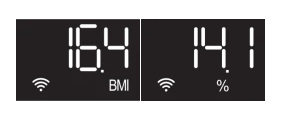
4. Bodyweight, BMI, Body fat% data will show on the scale. All of the 13 metrics store to app.
[Measure in Wi-Fi mode]
1. Make sure your scale has already paired with Wi-Fi. Measuring in Wi-Fi mode allows you to measure without running the App.
2. Step onto the scale with bare and dry feet on the scale to turn on the scale. Make sure the screen light up.
3. Keep standing on the scale for 5-10 seconds.
4. Bodyweight, BMI and Body Fat % data will be displayed on the scale after "0.00" has displayed twice.
Note:
1. The scale recognizes up to 8 users, which means the scale know who stepped on it according to his/her previous weight information and will show his/her BMI and Body fat% data on the scale when recognized successful.
2. Only when the difference of his/her weighing result is less than 2kg/4.4lbs compared to his/her last weighing result, the scale will recognize him/her.
3. Wait for seconds until the following symbol on the dispaly shows up.

After "OPEN APP" displayed on the scale, the weighing is finished.

Note: If "FAIL" displayed on the scale, which means the Wi-Fi scale fail to upload the data to the App. It might be caused by the weak Wi-Fi signal. Please make sure the Wi-Fi signal is strong and stable.
Recalibration
If the scale has been moved or turned upside down, it must be calibrated to ensure accurate results.
1. Please place your scale in a firm, flat and stable location, avoid any carpet;
2. Step on with one foot to wake up the scale;
3. When the monitor shows digits, then step off;
4. Then scale will show "CAL", then "0.0" or "0.00", the calibration process is complete.

https://renpho.com/